Wednesday, April 12, 2017

Goldilocks and The Three Bears


Reflection: I really liked using prezi! I had a lot of experience with it before, its really easy and super fun to use! Its also really easy for the kids to use, i would like to use this tool for the kids to do book reports its a could way to get a easy and interesting summary! I will also use this a lot to present lessons and keep them interesting!

Reading: Literature Standard 1
Ask and answer such questions as who, what, where, when, why, and how to demonstrate understanding of key details in a text.

Standard 5
Use technology tools (e.g., multimedia authoring, presentation, web tools, digital cameras, scanners) for individual and collaborative writing, communication, and publishing activities to create knowledge products for audiences inside and outside the classroom. (3, 4)

ISTE Knowledge Instructor- I critically select evaluate and synthesize digital resources into a collection that reflects my learning and builds my knowledge

Wednesday, April 5, 2017

Padlet- How Do You Stay Healthy?


UEN Content standards: Standard 1 Students will develop a sense of self. Objective 1
Describe and adopt behaviors for health and safety.Explain the importance of balance in a diet, and Relate behaviors that can help prevent disease (e.g., hand washing, good nutrition, fitness, universal precautions).

UEN EdTech Standards-Standard 8 Use technology resources (e.g., calculators, data collection probes, videos, educational software) for problem-solving, self-directed learning, and extended learning activities. (5, 6)

ISTE Knowledge Instructor- I critically select evaluate and synthesize digital resources into a collection that reflects my learning and builds my knowledge 

Reflection: I really liked this tool it was super simple and easy to use. It can be used for pretty much and subject in school. It is a good way to present something other than using things like Prezi and and PowerPoint. Its a quick and easy way to teach. It is good for asking questions and its very easy to design and add pictures according to your own style. I loved this tool and will definitely be using it in my classroom to get the kids thinking!

Made with Padlet

Saturday, April 1, 2017

Quip- Class conversations


Standard 5
Use technology tools (e.g., multimedia authoring, presentation, web tools, digital cameras, scanners) for individual and collaborative writing, communication, and publishing activities to create knowledge products for audiences inside and outside the classroom. (3, 4)

UEN Content Standard- Covers all contents

ISTE Standards-Global Communicator- I strive to broaden my perspective, understand others and work proficiently in teams using digital tools


Reflection: I really liked this tool! I choose it as my collaboration tool of choice! basically what you do is you add all of the parents emails and the students emails to your folder/ chat room. Inside the folder you can have a chat room and upload all kinds of assignments! Its such an awesome tool! it will be good to help send reminders and post newsletters and forgotten homework assignments, it also covers ever subject and content standard that i teach! I will for sure be using this in my classroom!

Friday, March 31, 2017

Newsletter


Strand 1
Students will achieve a level of competency in motor skills and movement patterns.
Skill development includes various locomotor and non-locomotor skills. Locomotor skills, which include walking, hopping, galloping, running, sliding, skipping, leaping, and jumping are the foundation of movement. Non-locomotor skills using balance and weight transfer include curling, stretching, twisting, and bending. Competency progresses into manipulative skills such as catching, rope jumping, underhand, and overhand throwing, dribbling, passing and receiving a ball with hands or feet.

Standard 5
Use technology tools (e.g., multimedia authoring, presentation, web tools, digital cameras, scanners) for individual and collaborative writing, communication, and publishing activities to create knowledge products for audiences inside and outside the classroom. (3, 4)


ISTE-Empowered learner: Students leverage technology to take an active role in choosing, achieving and demonstrating competency in their learning goals, informed by the learning sciences.

Classroom newsletter

Refelction: I really liked making this newsletter, it was really fun and easy to do. I used Google Docs to create it. I picture myself making one of these every week. It is a very good way to reach out to both students and parents. it helps them get ready for the upcoming week and helps them to know what is going on in the classroom. Its a vert fun thing to do and i cant wait to use it more!!

Wednesday, March 29, 2017

Mind mapping


Standard 4
Life Science. Students will gain an understanding of Life Science through the study of changes in organisms over time and the nature of living things. Identify basic needs of living things (plants and animals) and their abilities to meet their needs.

Standard 4
Use general purpose productivity tools and peripherals to support personal productivity, to re mediate skill deficits, and to facilitate learning throughout the curriculum

ISTE- Innovative Designer Students use a variety of technologies within a design process to identify and solve problems by creating new, useful or imaginative solutions.


Reflection: I absolutely loved this website!! Holy cow it was SO much fun to use and SO easy! when you first start they give you easy and simple instructions that really help you to understand what to do! You can easily add as many items as you want or just have a few and it looks great either way! You can change the colors and add images and change the font, pretty much anything you could imagine! I definitely can see myself and my students using this for many assignments and lessons for almost every subject! This was definitely my favorite tool so far!

Wednesday, March 15, 2017

Animoto- Cultures In Utah and The USA


Standard 1 Objective 2
Recognize and describe the contributions of different cultural groups in Utah and the nation.

Standard 5
Use technology tools (e.g., multimedia authoring, presentation, web tools, digital cameras, scanners) for individual and collaborative writing, communication, and publishing activities to create knowledge products for audiences inside and outside the classroom. (3, 4)

ISTE- Knowledge Constructor - i critically select evaluate and synthesize digital resources into a collection that reflects my learning and builds my knowledge

Relfection: I really liked Animoto. it is super easy to use, I can use this in my classroom for almost any subject and every lesson i am trying to teach. It is very instructional and its not hard to learn how to use. You can add your own pictures and captions. The one thing that i disliked was you were only aloud to add very short captions, I would have liked to make my descriptions a little bit longer. Other than that small detail i really loved Animoto and will definitely be using it a lot. I highly recommend it.


Wednesday, March 8, 2017

Tiki-Toki- Staying Safe Throughout the Day


UEN-Standard 1
Students will develop a sense of self.-Adopt basic safety habits (e.g., wear a seatbelt, practice bicycle safety, find adult help in an emergency).

UEN-EdTech-Standard 4
Use general purpose productivity tools and peripherals to support personal productivity, to remediate skill deficits, and to facilitate learning throughout the curriculum. (3)

ISTE- Knowledge constructor- i critically select evaluate and synthesize digital resources into a collection that reflects my learning and builds my knowledge


Tiki-Toki Staying Safe


Image result for staying safe    Image result for tiki toki

Reflection: I really liked using Tiki-Toki. I definitely will be using this in my classroom when I teach about history and things that have multiple steps/ dates. I used mine to teach the students how to be safe throughout their days. Everyday students and kids associate themselves with many dangerous things so it is important that they know how to take care of themselves. This tiki toki is a day and the things that may happen through out the students day. This timeline instructs students on how they should be and act in those situations. My students can use my tiki toki at home to study for tests and i can use it in my classroom as part of my lesson. The only hard part of tiki toki was being able to space the time line so they weren't too far apart, i had to change the time because the items were too far apart and you couldn't see them. Other than that i loved tiki toki and will be using it a lot. I also think that once i learn how to use it more i will like it more.

Wednesday, March 1, 2017

StudyBlue


Standard 5
Use technology tools (e.g., multimedia authoring, presentation, web tools, digital cameras, scanners) for individual and collaborative writing, communication, and publishing activities to create knowledge products for audiences inside and outside the classroom

Standard 2.OA.2
Fluently add and subtract within 20

ISTE- Knowledge Constructor: I critically select evaluate and synthesize digital resources into a collection that reflects my learning and builds my knowledge 


Image result for studyblue flashcards

Reflection: I used STUDY BLUE  as my tool of choice! I found it really easy to use and very helpful for myself and for the students. Its a very good and simple way for students to be able study from home and put in extra practice for tests. It was super easy top create the flash cards and using the tools provided  is very easy. You can make as many sets of flash cards as you would like. The flash cards can have pictures and can have any symbols. So once my students get into more intensive math i can add pictures to help them count. Also for the flash cards i could add images of apples and oranges and help them do math through visualization instead of just practicing numbers. It will help them solve equations more easier and to be able to solve faster. It also has a review sheet of all the cards and quizzes that you can take after you study the cards I really liked study blue and will definitely be using it a lot in my classroom. It fits with all the standards and helps students learn how to use technology better.

Wednesday, February 22, 2017

Storybird- Examining Art


UEN-Standard 2 CONNECT 2.D.CO.1   Observe a work of visual art asking questions for discussion, then describe and express through movement something of interest about the artwork.

UEN-EdTech- Standard 5: Use technology tools (e.g., multimedia authoring, presentation, web tools, digital cameras, scanners) for individual and collaborative writing, communication, and publishing activities to create knowledge products for audiences inside and outside the classroom. (3, 4)

ISTE-Innovative Designer: I solve problems by creating new and imaginative solutions using a variety of digital tools


Storybird-Understanding Artwork


Image result for storybird
Refelction: To be honest at first i thought storybird was going to very hard and difficult. But then i found my topic and the artwork that i wanted and it was super easy and simple. Storybird had pictures all laid out for you and all you have to do is add a picture and and a caption. For my storybird i made a picture book of paintings then added questions to go along with them. This way the students could examine the art work and have a discussion. This storybird goes along with the UEN standards and ISTE standards very well. The only con is it is a little pricey to buy the book. It does allow you to look at a example of the book online which is very helpful. I plan on using this in my classroom, It will be helpful to my students and myself when i may not be able to find a book or lesson plan to go a long with a standard. I can easily use storybird to create and easy to understand lesson in the way that i want.

Wednesday, February 15, 2017

eMaze- All About Street Signs


UEN-Objective 1

Identify common symbols and physical features of a community, and explain how they affect people's activities in that area

Standard 5
Use technology tools (e.g., multimedia authoring, presentation, web tools, digital cameras, scanners) for individual and collaborative writing, communication, and publishing activities to create knowledge products for audiences inside and outside the classroom. (3, 4)

Empowered Learner 
i use technology to set goals work toward achieving them and demonstrate my learning 


Image result for street signs

Reflection: I really loved the eMaze! It was so fun and so easy to do. You can easily add pictures and videos from the web. I really loved how many templates they had that were already made it cut the time down a lot instead of having to start a brand new blank canvas. I believe that the eMaze with work very successfully in my classroom. Its a good way to present a new topic or to go over homework or create quizzes. For mine i created a quiz and added a video the night previous the students will take home a sheet with all the street signs and study them, the next day they will come to class and watch the video then take the quiz and write their answers personally on a piece of paper. Once they have answered the question we will go over it as a class. I think this will also help promote better classroom discussions and take away some of the testing anxiety some students may have. I'm very excited to try it out! I honestly didn't find any cons with it! everything about it was great!

Wednesday, February 8, 2017

2nd Grade PE-YouTube videos


UEN-Standard 2.1.2
 Run, using a well-developed pattern while differentiating between jogging and running.

UEN EdTech-Standard 4
 Use general purpose productivity tools and peripherals to support personal productivity, to remediate  skill deficits, and to facilitate learning throughout the curriculum. (3)

ISTE-Global Colborater
 I strive to broaden my perspective understand others and work effectively in teams using digital tools

Reflection: I plan on using this in my classroom to help teach the students how to get comfortable with working with each other, and learning the difference between jogging and running and how to run. I believe the games listed above fit that category very well. It helps the students learn how to run and jog in intervals how to slow down to stop and speeding up from stopping. Helping them to become comfortable with their bodies and how they can use them in everyday life.My students can use this assessment tool by watching the videos to teach them how to play the games. The instructional videos make is easier for the students to understand instead of  me standing and running around the classroom trying to be an example for dozens of students this video makes it a lot more easy to visualize what they are doing and the rules are clearly explained. My students can easily access this from home on my blog if they were to play it with their friends. These games fit very well with the second grade level and follow all of the content standards.

Wednesday, February 1, 2017

Info graphics- How to Stay Healthy

UEN Utah Core Standards: Standard 1-Students will develop a sense of self.

UEN EdTech Standards: Standard 5-Use technology tools (e.g., multimedia authoring, presentation, web tools, digital cameras, scanners) for individual and collaborative writing, communication, and publishing activities to create knowledge products for audiences inside and outside the classroom. (3, 4)

ISTE Standards: Knowledgeable constructor: I critically select, evaluate, and synthesize digital resources into a collection that reflects my learning and builds my knowledge 

Reflection:I really enjoyed doing this project is was the first time that i had ever used Infogrpahic. It was easy to use and easy to figure out. I had the option to either create my own tablet or use a sample. As i created my own is was easy to add images from the web and change colors and fonts. I think this will be very helpful in my classroom, i can use this website to create flyers and posters to hang up in my classroom. I can also teach my students how to use it and and they can easily create projects like book reports from home. I honestly didn't find any cons besides that it was a little bit time consuming, but other that that it was easy fun and helped me to create new ideas. I believe this will help with students creativity!


Monday, January 30, 2017

Brochure-How animals survive in different environments


UEN State :
Standard 4
Life Science. Students will gain an understanding of Life Science through the study of changes in organisms over time and the nature of living things. Objective 1:Compare and contrast the characteristics of living things in different habitats.

UEN EdTech:
Standard 5
Use technology tools (e.g., multimedia authoring, presentation, web tools, digital cameras, scanners) for individual and collaborative writing, communication, and publishing activities to create knowledge products for audiences inside and outside the classroom. (3, 4)

ISTE:
Creative communicator: i communicate effectively and express myself  creativity using different tools styles formats and digital media.


Image result for animals and their habitats

Reflection: This project was very fun to do. The projects is assigns to every student individually each  student chooses an animal and researches their, habitat, the food the eat, their size, and some interesting facts. Then during class each student will present their brochure. Doing this will help students to learn and understand every animals has a different habitat and different way of living and eating. The pros of this are that the students teach each other, they teach themselves, and they learn how to use technology and learn researching capabilities. The Cons are the students could get inaccurate information, make up information or chose to not do the project correctly. Other than that i believe that the protect does a very good job of teaching the students how to use technology, how to teach themselves, and others. I will use this in my classroom to help students learn about how animals change and grow in different environments, which follows the 4th Utah uen state standard 

Wednesday, January 25, 2017

All About Planets Quiz Google Forms


UEN Ed teach Standard 2: Earth and Space Science. Students will gain an understanding of Earth and Space Science through the study of earth materials, celestial movement, and weather.


ISTE- Innovative designer- I solve problems by creating new and imaginative solutions using a variety of digital tools


2nd Grade Science Standard 8:technology resources (e.g., calculators, data collection probes, videos, educational software) for problem-solving, self-directed learning, and extended learning activities. (5, 6)


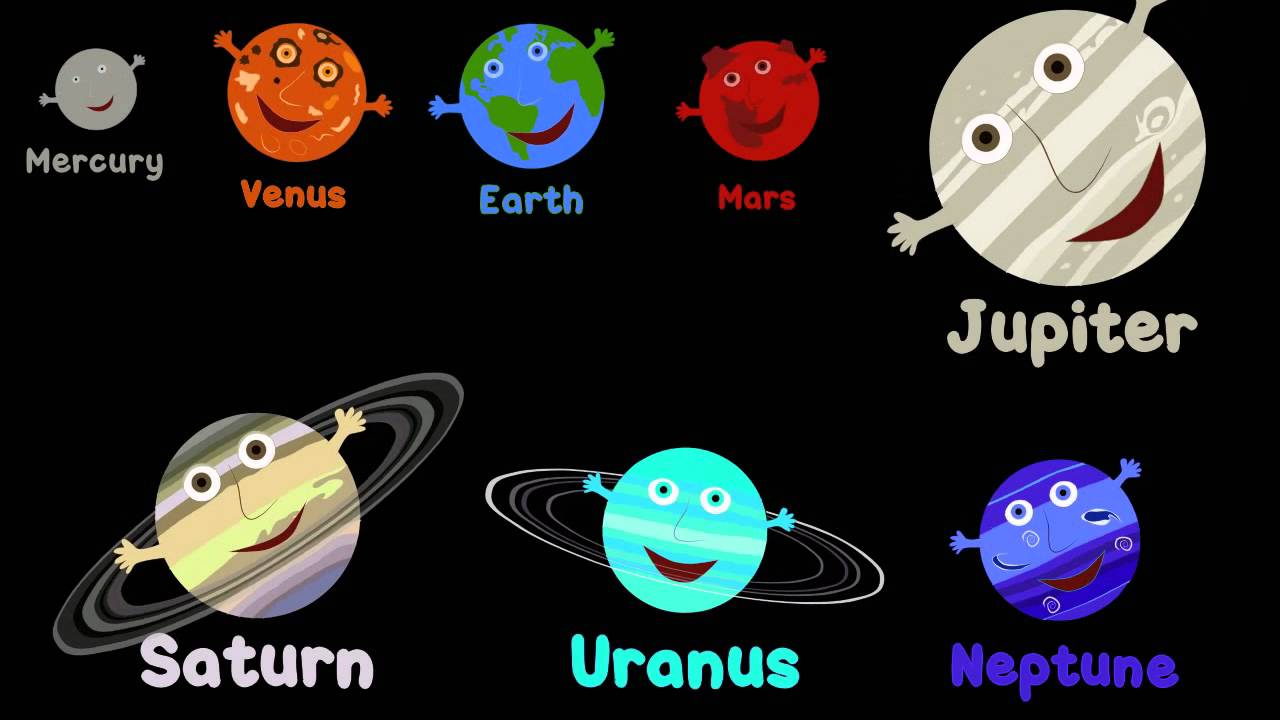
Image result for names of all the planets 


Reflection: I used google from to make a quiz based off of a video that i had student watch at home for a homework assignment. They were assigned to watch the video as many times as the needed to remember the information. using google docs was very helpful to me as a teacher, it made the grading super easy, I was able to see which students watched the video, and it will make it easier for me as a teacher in future years. Instead of having to go to the copy center every year, i can pull the video and the doc up on my blog very easily.  The cons of this might be that students may not have accesses to technology or not have the knowledge on how to use it. I can fix this by teaching the students and check with those who don't have access and give them an alternate way to complete the assignment.Using Google docs saved me plenty of time now and will in the future  


Wednesday, January 18, 2017

Pinterest Project-2nd Grade Science Planets


I have created a pinterest board for the 2nd Standard for science. In My board I have ideas that I would like to incorporate into my classroom. The pin that I am most exited to try is the "solar system rap" video. Its an animated video of the planets in the solar system telling about themselves and there position, size, and color. I think that this will be enjoyable for the students. Im really excited to use this in the future. It makes learning fun and easy. I  really liked using pinterest, that is how i found that video. Its full of great ideas and very easy to find projects and assignments that correlate with the standard needed. The only con of pinterest is sometimes the links dont work or the standards that they say they are, are incorrect. so you have to do your research before you incorporate it into your lesson plan.


UEN Ed teach Standard 2: Earth and Space Science. Students will gain an understanding of Earth and Space Science through the study of earth materials, celestial movement, and weather.


ISTE- Innovative designer- I solve problems by creating new and imaginative solutions using a variety of digital tools


2nd Grade Science Standard 8:technology resources (e.g., calculators, data collection probes, videos, educational software) for problem-solving, self-directed learning, and extended learning activities. (5, 6)


  • watch this video until you have it memorized, come to class and be ready to recite your knowledge of the planets 


Pinterest Lesson Plans-Science